# methods方法
- 使用方式一:事件监听使用,如
@click="changeCount"; - 使用方式二:直接从模板中调用方法
computedData,类似于后面介绍的计算属性
<template>
  <h2>{{computedData(count)}}</h2>
  <button @click="changeCount">改变count</button>
</template>
<script>
export default {
  name: 'App',
  data(){
    return {
      count:4
    }
  },
  methods:{
    computedData(count){
      return count+'change'
    },
    changeCount(){
      this.count++
    }
  }
}
</script>
2
3
4
5
6
7
8
9
10
11
12
13
14
15
16
17
18
19
20
21
22
注意1
从模板调用的方法不应该有任何副作用,比如"更改数据"或"触发异步进程"。这些应该放在生命周期钩子中。
因为用作"模板调用的方法"相当于计算属性,会监听数据变化再次触发该方法,这样就会导致死循环! template模板调用的方法--->执行模板调用的方法,改变data数据--->触发模板调用的方法--->执行模板调用的方法,改变data数据--->陷入死循环
<template>
  <h2>{{computedData(count)}}</h2><!--模板调用的方法-->
</template>

<script>
export default {
  name: 'App',
  data(){
    return {
      count:4
    }
  },
  methods:{
    computedData(count){//在"模板调用的方法"更改数据,导致死循环
      this.count++
      return count+'change'
    }
  }
}
</script>
2
3
4
5
6
7
8
9
10
11
12
13
14
15
16
17
18
19
20
注意2
Vue 自动为 methods 绑定 this,以便于它始终指向组件实例。这将确保方法在用作事件监听或回调时保持正确的 this 指向。
在定义 methods 时应避免使用箭头函数,因为这会阻止 Vue 绑定恰当的 this 指向。
methods:{
    changeCount:()=>{ //使用箭头函数定义,会报错
        this.count++
    }
}
2
3
4
5
# 计算属性
通过其他变量计算得到得到另外一个属性,对于任何包含响应式数据的复杂逻辑,使用计算属性。
由于和“模板调用的方法”类似,这里做对比: 使用计算属性 computedData 和方法 handleData 计算数据复杂逻辑之后的值,区别在于
- 计算属性相当于逻辑处理后的data,具有响应式,以值的形式放在 template 中;而methods,需要在template中执行函数。方法可以传参/计算属性无法传参。
- 计算属性是有缓存的,除非依赖的响应数据发生变化才会重新取值;而 methods 每次使用都会重新取值。
<template>
  <h3 v-for="(item,index) in [1,2,3,4]" :key="index">{{total}}</h3>
  <button @click="changeCount">改变count</button>
  <h4 v-for="(item,index) in [1,2,3,4]" :key="index">{{handleTotal()}}</h4>
</template>
<script>
export default {
  name: 'App',
  data(){
    return {
      count:0
    }
  },
  computed:{
    total(){
      console.log('触发计算属性');
      return this.count+'computed'
    }
  },
  methods:{
    handleTotal(count){
      console.log('触发方法');
      return this.count+'change'
    },
    changeCount(){
      this.count++
    }
  }
}
</script>
2
3
4
5
6
7
8
9
10
11
12
13
14
15
16
17
18
19
20
21
22
23
24
25
26
27
28
29
30
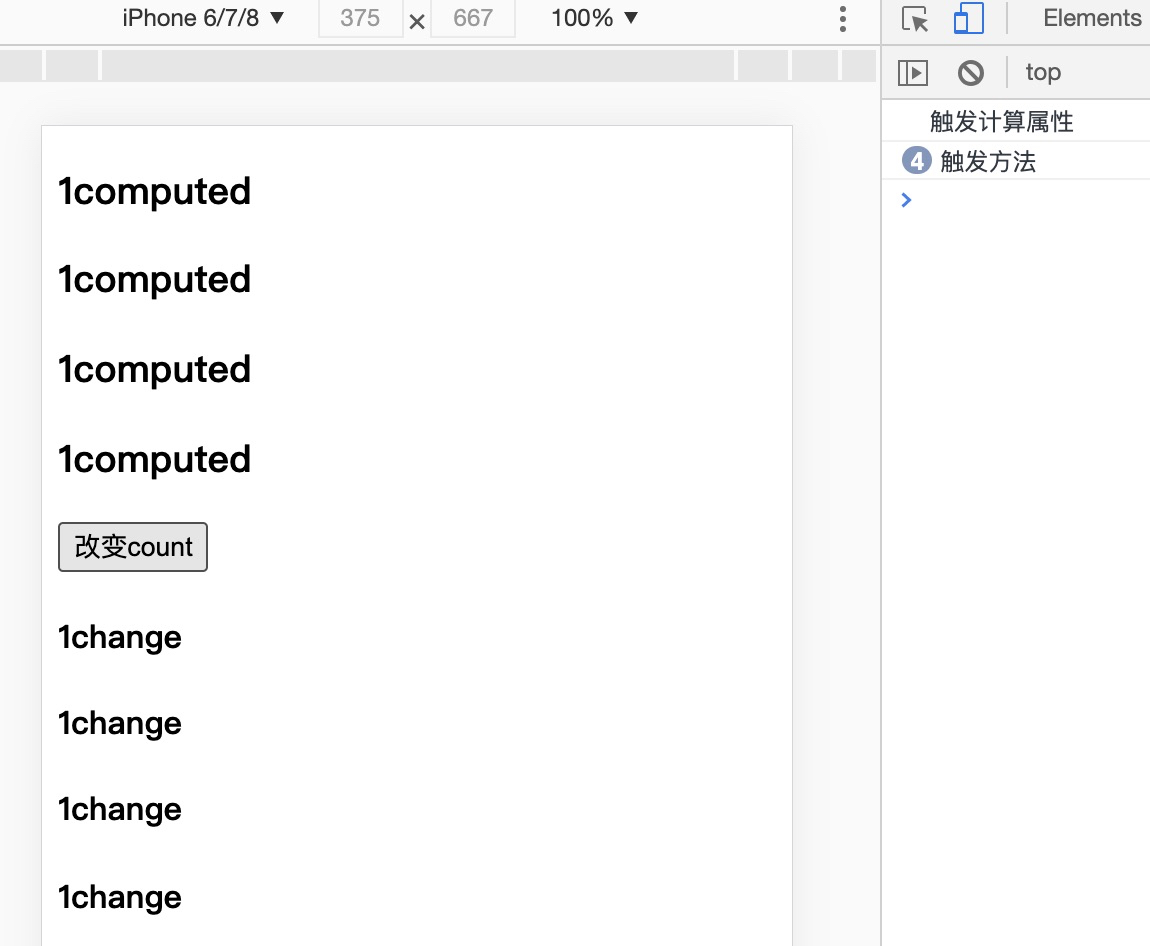
如下图可以看到,多次使用了computed,只会执行一次,具有缓存
再比如计算属性中有大量的计算逻辑,如多层循环,则有缓存可以大量减少重复计算问题。
computed:{
    total() {
        console.log('触发计算属性');
        var vel=this.val;
        var sum=0,len=vel.length;
        for(var i=0;i<len;i++){
            sum+=vel[i]
        }
        return sum;
    }
}
2
3
4
5
6
7
8
9
10
11
计算属性的setter和getter
计算属性的set和get可以进一步的设置计算属性,此外
<template>
  <div>
      <p>fullName值: {{fullName}}</p>
      <button @click="ClickComputed">点击改变fullName的值</button>
  </div>
</template>
<script>
export default {
  data () {
    return {
      firstName: 'Foo'
    }
  },
  methods: {
    ClickComputed () {
      this.fullName = 'fullName 的新值'
    }
  },
  mounted(){
    this.fullName = 'tom lili'
  },
  computed: {
    fullName: {
      get: function () {
        return this.firstName + ':'+ this.lastName
      },
      set: function (newValue) {
        const names = newValue.split(' ')
        this.firstName = names[0]
        this.lastName = names[names.length - 1]
      }
    }
  }
}
</script>
2
3
4
5
6
7
8
9
10
11
12
13
14
15
16
17
18
19
20
21
22
23
24
25
26
27
28
29
30
31
32
33
34
35
# 侦听器
1、方法一:监听变量
第一次绑定的时候,不会执行监听函数,只有值发生改变才会执行
<template>
  <div>
      <p>fullName值: {{fullName}}</p>
      <button @click="ClickName">点击改变fullName的值</button>
  </div>
</template>
<script>
export default {
  data () {
    return {
      fullName: 'old值'
    }
  },
  methods: {
    ClickName () {
      this.fullName = 'new新值'
    }
  },
  watch:{
    fullName(newVal,oldVal){
      console.log(newVal,oldVal)
    }
  }
}
</script>
2
3
4
5
6
7
8
9
10
11
12
13
14
15
16
17
18
19
20
21
22
23
24
25
2、使用 immediate 和 handler
第一次绑定的时候,就会执行监听函数
immediate表示在watch中首次绑定的时候,是否执行handler,
值为true则表示在watch中声明的时候,就立即执行handler方法,
值为false,则和一般使用watch一样,在数据发生变化的时候才执行handler。
<template>
  <div>
      <p>fullName值: {{fullName}}</p>
      <button @click="ClickName">点击改变fullName的值</button>
  </div>
</template>
<script>
export default {
  data () {
    return {
      fullName: 'old值'
    }
  },
  methods: {
    ClickName () {
      this.fullName = 'new新值'
    }
  },
  watch:{
    fullName:{
      handler(newVal,oldVal){
        console.log(newVal,oldVal)
      },
      immediate:true
    }
  }
}
</script>
2
3
4
5
6
7
8
9
10
11
12
13
14
15
16
17
18
19
20
21
22
23
24
25
26
27
28
3、深度监听deep
当需要监听一个对象/数组的改变时,普通的watch方法无法监听到对象内部属性的改变,此时就需要deep属性对对象进行深度监听。
<template>
  <div>
      <p>{{fullName.firstName}}:{{fullName.lastName}}</p>
      <button @click="ClickName">点击改变fullName的值</button>
  </div>
</template>
<script>
export default {
  data () {
    return {
      fullName: {
        firstName:'li',
        lastName:'mei'
      }
    }
  },
  methods: {
    ClickName () {
      this.fullName.firstName = '王'
    }
  },
  watch:{
    fullName:{
      handler(newVal,oldVal){
        console.log(newVal,oldVal)
      },
      deep:true
    }
  }
}
</script>
2
3
4
5
6
7
8
9
10
11
12
13
14
15
16
17
18
19
20
21
22
23
24
25
26
27
28
29
30
31
如确定监听某个属性,可以按照以下形式:
watch:{
    'fullName.firstName'(newVal,oldVal){
        console.log(newVal,oldVal)
    }
}
2
3
4
5
← 应用实例 条件&列表渲染&事件处理 →