代码放在
demo/react/awesome/src/components/MyTsInReact文件夹中
# 1、给 state 设置 TS 类型
interface ISourceMapList {
  fileUid: string;
  fileName: string;
  createTime: string;
}
const [srcList, setSrcList] = useState<ISourceMapList[]>([]);
2
3
4
5
6
# 2、给函数设置类型
const handleCurrNumber = (
  parmas: number | string,
  isBlur: boolean = false
): void => {};
2
3
4
# 3、Record 类型
type proxyKType = Record<K,T>
会将 K 中的所有属性值都转换为 T 类型,并将返回的新类型返回给 proxyKType,K 可以是联合类型、对象、枚举…
示例:
type petsGroup = "dog" | "cat" | "fish";
interface IPetInfo {
  name: string;
  age: number;
}

type IPets = Record<petsGroup, IPetInfo>;

const animalsInfo: IPets = {
  dog: {
    name: "dogName",
    age: 2,
  },
  cat: {
    name: "catName",
    age: 3,
  },
  fish: {
    name: "fishName",
    age: 5,
  },
};
2
3
4
5
6
7
8
9
10
11
12
13
14
15
16
17
18
19
20
21
22
# 属性名不确定的对象
/* 属性名不确定的对象 */
export type Paths = {
  [key: string]: string,
};

// 等同于
// export type Paths = Record<string, string>;

const paths: Paths = {};

paths.home = "/home"; //OK
paths.settings = "/settings"; //OK
paths.somePath = "/somePath"; //OK
2
3
4
5
6
7
8
9
10
11
12
13
# React.FC 的使用[删除]
注意,React18 修改了 FC 的类型定义,现在并不会包含 children 属性了,需要自己定义:
interface TestProps {
  children: React.ReactNode;
}
2
3
- 1、React.FC 是函数式组件,等同于 React.FunctionComponent:
- 2、props 自动获得传入的泛型已经 children 属性,函数自动获得 propTypes,contextTypes,defaultProps 和 displayName 四个属性,
虽然能够运行,但是是这样写
const { message, children } = props;会提示警告
import React from "react";
/*
// 等同于
IPropsType & {
  children: React.ReactNode
  propTypes?: WeakValidationMap<P>;
  contextTypes?: ValidationMap<any>;
  defaultProps?: Partial<P>;
  displayName?: string;
}
*/
interface IPropsType {
  message: string;
}

const ChildBox: React.FC<IPropsType> = (props) => {
  const { message, children } = props;
  return (
    <>
      {children}
      <div>{message}</div>
    </>
  );
};

const MyTsDemo1 = () => {
  return (
    <>
      <ChildBox message="hello">我是父组件内容</ChildBox>
    </>
  );
};

export default MyTsDemo1;
2
3
4
5
6
7
8
9
10
11
12
13
14
15
16
17
18
19
20
21
22
23
24
25
26
27
28
29
30
31
32
33
34
改为:
import React from "react";
interface IPropsType {
  message: string;
  children: React.ReactNode;
}
const ChildBox = (props: IPropsType) => {
  const { children, message } = props;
  return (
    <>
      {children}
      <div>{message}</div>
    </>
  );
};

const MyTsDemo1 = () => {
  return (
    <>
      <ChildBox message="hello">我是父组件内容</ChildBox>
    </>
  );
};

export default MyTsDemo1;
2
3
4
5
6
7
8
9
10
11
12
13
14
15
16
17
18
19
20
21
22
23
24
# React 组件 Props
/* React 组件 Props */
interface Props {
  disabled?: boolean;
  style?: React.CSSProperties;
  children?: React.ReactNode;
  onClick?: () => void;
}
//props的解构赋值
const Button = ({ onClick, disabled, children, style }: Props) => {
  return (
    <button onClick={onClick} disabled={disabled} style={style}>
      {children}
    </button>
  );
};

export default Button;
2
3
4
5
6
7
8
9
10
11
12
13
14
15
16
17
# 类型判断
export function printId(id: string | number) {
  if (typeof id === "string") {
    console.log(id.toUpperCase());
  } else {
    console.log(id);
  }
}

printId(101); // OK
printId("202"); // OK
2
3
4
5
6
7
8
9
10
# 部分对象 Partial
/* 部分对象 Partial */

interface User {
  name: string;
  age: number;
  occupation: string;
}

export const users: User[] = [
  {
    name: "Max Mustermann",
    age: 25,
    occupation: "Chimney sweep"
  },
  {
    name: "Wilson",
    age: 23,
    occupation: "Ball"
  }
];

type Criteria = {
  [Property in keyof User]?: User[Property];
};

// 等同于
// type Criteria = Partial<User>;
2
3
4
5
6
7
8
9
10
11
12
13
14
15
16
17
18
19
20
21
22
23
24
25
26
27
28
29
# 对象类型的修改:Omit
/* 对象类型的修改 */
/* extends可以继承对象类型,但不可与原类型冲突,此时可以先使用 Omit 去除需要修改的属性 */

export interface TreeNode {
  id: number;
  value: number;
  children?: TreeNode[];
}

// 1. 去除 TreeNode 的 id 属性同时修改 children 属性的类型
export interface NodeWithoutId extends Omit<TreeNode, "id" | "children"> {
  children?: NodeWithoutId[];
}

// OK
const nodeWithoutId: NodeWithoutId = {
  value: 1,
  children: [
    {
      value: 2,
    },
  ],
};
2
3
4
5
6
7
8
9
10
11
12
13
14
15
16
17
18
19
20
21
22
23
# React.ReactNode 用来定义 react 元素
ReactNode 可以是一个 ReactElement,一个 ReactFragment,一个 string 类型,一个 number 类型,或者是 null,或者是 boolean,或者是 undefined,或者一个 ReactNode 的数组
import React, { useState, useEffect, ReactElement } from "react";
interface IChildProps {
  description: React.ReactNode;
}
const Child: React.FC<IChildProps> = (props) => {
  const { description } = props;
  return <div>{description}</div>;
};

const App = () => {
  return (
    <div>
      <Child description={"大三大四的了"} />
      <Child description={123} />
      <Child description={true} />
      <Child description={<div className="box">你好</div>} />
    </div>
  );
};
export default App;
2
3
4
5
6
7
8
9
10
11
12
13
14
15
16
17
18
19
20
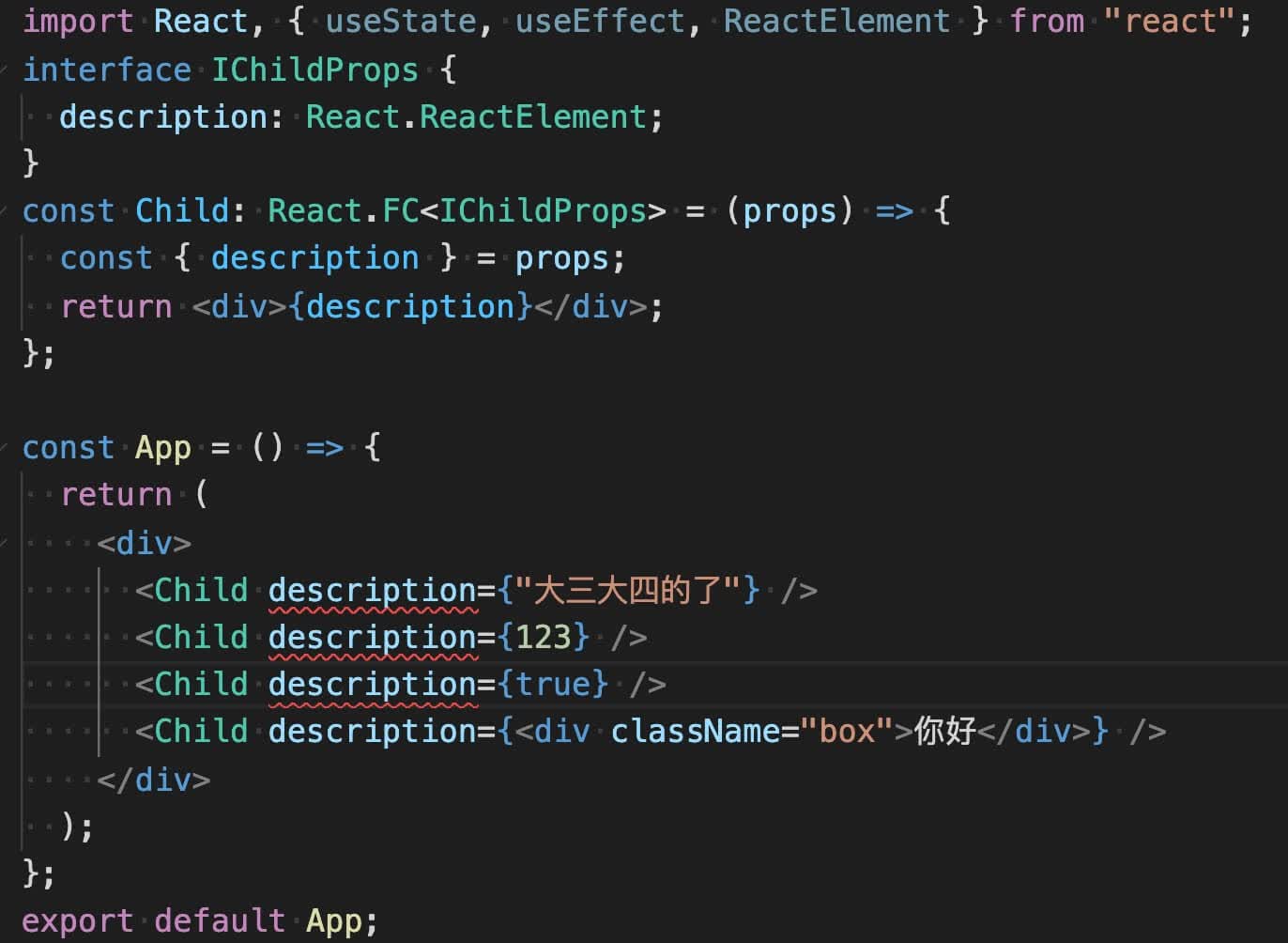
如果改成 ReactElement,则其他的会报错:
# CSSProperties
import React, { useState, useEffect, CSSProperties } from "react";

interface IChildProps {
  styleCss: CSSProperties;
}
const Child: React.FC<IChildProps> = (props) => {
  const { styleCss } = props;
  return <div style={styleCss}>子组件内容</div>;
};

const App = () => {
  return (
    <div>
      <Child styleCss={{ color: "red" }} />
    </div>
  );
};
export default App;
2
3
4
5
6
7
8
9
10
11
12
13
14
15
16
17
18
# useState
默认情况下,React 会为根据设置的 state 的初始值来自动推导 state 以及更新函数的类型:
如果已知 state 的类型,可以通过以下形式来自定义 state 的类型:
const [count, setCount] = useState<number>(1)
如果初始值为 null,需要显式地声明 state 的类型,这样也可以保证在你直接访问 count 上的属性时,提示你它有可能是 null。
const [count, setCount] = useState<number | null>(null);
import React, { useRef, useEffect, useState } from "react";
interface IUser {
  name: string;
}
const App: React.FC = () => {
  const [user, setUser] = useState<IUser | null>(null);
  const changeFun = () => {
    //否则这里报错
    setUser({ ...user, name: "hello" });
  };
  return (
    <div>
      <div onClick={changeFun}>{user?.name}btn</div>
    </div>
  );
};
export default App;
2
3
4
5
6
7
8
9
10
11
12
13
14
15
16
17
如果 state 是一个对象,想要初始化一个空对象,可以使用断言来处理:
const [user, setUser] = React.useState<IUser>({} as IUser);
实际上,这里将空对象{}断言为 IUser 接口就是欺骗了 TypeScript 的编译器,由于后面的代码可能会依赖这个对象,所以应该在使用前及时初始化 user 的值,否则就会报错。
import React, { useState, useEffect, ReactElement } from "react";

interface IUser {
  name: string;
}
const Child = () => {
  const [user, setUser] = React.useState<IUser>({} as IUser);
  useEffect(() => {
    setUser({ name: "xiao" });
  }, []);
  return <div>{user.name}</div>;
};

const App = () => {
  return (
    <div>
      <Child />
    </div>
  );
};
export default App;
2
3
4
5
6
7
8
9
10
11
12
13
14
15
16
17
18
19
20
21
# useRef
import React, { useRef, useEffect } from "react";

const App = () => {
  const nameInput = useRef<HTMLInputElement>(null);
  useEffect(() => {
    //如果上面没有定义HTMLInputElement,则这里报错,如果没有?也会报错
    nameInput.current?.focus();
  }, []);
  return <input ref={nameInput} />;
};
export default App;
2
3
4
5
6
7
8
9
10
11
const ref1 = useRef<HTMLElement>(null!);
null!这种语法是非空断言,跟在一个值后面表示你断定它是有值的,所以在你使用 inputEl.current.focus() 的时候,TS 不会给出报错。
# Event 事件类型
常见的 Event 事件对象如下:
剪切板事件对象:ClipboardEvent<T = Element> 拖拽事件对象:DragEvent<T = Element> 焦点事件对象:FocusEvent<T = Element> 表单事件对象:FormEvent<T = Element> Change 事件对象:ChangeEvent<T = Element> 键盘事件对象:KeyboardEvent<T = Element> 鼠标事件对象:MouseEvent<T = Element, E = NativeMouseEvent> 触摸事件对象:TouchEvent<T = Element> 滚轮事件对象:WheelEvent<T = Element> 动画事件对象:AnimationEvent<T = Element> 过渡事件对象:TransitionEvent<T = Element>
type State = {
  text: string;
};

const App: React.FC = () => {
  const [text, setText] = useState<string>("");

  const onChange = (e: React.FormEvent<HTMLInputElement>): void => {
    setText(e.currentTarget.value);
  };

  return (
    <div>
      <input type="text" value={text} onChange={onChange} />
    </div>
  );
};
2
3
4
5
6
7
8
9
10
11
12
13
14
15
16
17
示例 2
questionList.map(item => (
    <div
    	key={item.id}
  	role="button"
  	onClick={e => handleChangeCurrent(item, e)}
    >
    // 组件内容...
    </div>
)

const handleChangeCurrent = (item: IData, e: React.MouseEvent<HTMLDivElement>) => {
    e.stopPropagation();
    setCurrent(item);
};
2
3
4
5
6
7
8
9
10
11
12
13
14
注意上面是 event 的类型,下面是
# 事件处理函数类型
type EventHandler<E extends SyntheticEvent<any>> = {
  bivarianceHack(event: E): void;
}["bivarianceHack"];

type ReactEventHandler<T = Element> = EventHandler<SyntheticEvent<T>>;
// 剪切板事件处理函数
type ClipboardEventHandler<T = Element> = EventHandler<ClipboardEvent<T>>;
// 复合事件处理函数
type CompositionEventHandler<T = Element> = EventHandler<CompositionEvent<T>>;
// 拖拽事件处理函数
type DragEventHandler<T = Element> = EventHandler<DragEvent<T>>;
// 焦点事件处理函数
type FocusEventHandler<T = Element> = EventHandler<FocusEvent<T>>;
// 表单事件处理函数
type FormEventHandler<T = Element> = EventHandler<FormEvent<T>>;
// Change事件处理函数
type ChangeEventHandler<T = Element> = EventHandler<ChangeEvent<T>>;
// 键盘事件处理函数
type KeyboardEventHandler<T = Element> = EventHandler<KeyboardEvent<T>>;
// 鼠标事件处理函数
type MouseEventHandler<T = Element> = EventHandler<MouseEvent<T>>;
// 触屏事件处理函数
type TouchEventHandler<T = Element> = EventHandler<TouchEvent<T>>;
// 指针事件处理函数
type PointerEventHandler<T = Element> = EventHandler<PointerEvent<T>>;
// 界面事件处理函数
type UIEventHandler<T = Element> = EventHandler<UIEvent<T>>;
// 滚轮事件处理函数
type WheelEventHandler<T = Element> = EventHandler<WheelEvent<T>>;
// 动画事件处理函数
type AnimationEventHandler<T = Element> = EventHandler<AnimationEvent<T>>;
// 过渡事件处理函数
type TransitionEventHandler<T = Element> = EventHandler<TransitionEvent<T>>;
2
3
4
5
6
7
8
9
10
11
12
13
14
15
16
17
18
19
20
21
22
23
24
25
26
27
28
29
30
31
32
33
示例:
import React, { useRef, useEffect, useState } from "react";

const App: React.FC = () => {
  const [text, setText] = useState<string>("");

  const onChange: React.ChangeEventHandler<HTMLInputElement> = (e) => {
    setText(e.currentTarget.value);
  };

  return (
    <div>
      <input
        type="text"
        value={text}
        onChange={onChange}
        placeholder="默认文案"
      />
    </div>
  );
};
export default App;
2
3
4
5
6
7
8
9
10
11
12
13
14
15
16
17
18
19
20
21
这里给 onChange 方法定义了方法的类型,它是一个 ChangeEventHandler 的类型,并且作用的对象时一个 HTMLImnputElement 类型的标签(input 标签)。 区别于上面的给 event 定义的类型。
# HTML 常见标签类型
a: HTMLAnchorElement;
body: HTMLBodyElement;
br: HTMLBRElement;
button: HTMLButtonElement;
div: HTMLDivElement;
h1: HTMLHeadingElement;
h2: HTMLHeadingElement;
h3: HTMLHeadingElement;
html: HTMLHtmlElement;
img: HTMLImageElement;
input: HTMLInputElement;
ul: HTMLUListElement;
li: HTMLLIElement;
link: HTMLLinkElement;
p: HTMLParagraphElement;
span: HTMLSpanElement;
style: HTMLStyleElement;
table: HTMLTableElement;
tbody: HTMLTableSectionElement;
video: HTMLVideoElement;
audio: HTMLAudioElement;
meta: HTMLMetaElement;
form: HTMLFormElement;
2
3
4
5
6
7
8
9
10
11
12
13
14
15
16
17
18
19
20
21
22
23
那什么时候会使用到标签类型呢,上面第四部分的 Event 事件类型和事件处理函数类型中都使用到了标签的类型。上面的很多的类型都需要传入一个 ELement 类型的泛型参数,这个泛型参数就是对应的标签类型值,可以根据标签来选择对应的标签类型。这些类型都继承自 HTMLElement 类型,如果使用时对类型类型要求不高,可以直接写 HTMLELement。比如下面的例子:
<Button
  type="text"
  onClick={(e: React.MouseEvent<HTMLElement>) => {
    handleOperate();
    e.stopPropagation();
  }}
>
  <img src={cancelChangeIcon} alt="" />
  取消修改
</Button>
2
3
4
5
6
7
8
9
10
其实,在直接操作 DOM 时也会用到标签类型,虽然我们现在通常会使用框架来开发,但是有时候也避免不了直接操作 DOM。比如我在工作中,项目中的某一部分组件是通过 npm 来引入的其他组的组件,而在很多时候,我有需要动态的去个性化这个组件的样式,最直接的办法就是通过原生 JavaScript 获取到 DOM 元素,来进行样式的修改,这时候就会用到标签类型。 来看下面的例子:
document.querySelectorAll(".paper").forEach((item) => {
  const firstPageHasAddEle = (item.firstChild as HTMLDivElement).classList.contains(
    "add-ele"
  );

  if (firstPageHasAddEle) {
    item.removeChild(item.firstChild as ChildNode);
  }
});
2
3
4
5
6
7
8
9
在第一页有个 add-ele 元素的时候就删除它。这里我们将 item.firstChild 断言成了 HTMLDivElement 类型,如果不断言,item.firstChild 的类型就是 ChildNode,而 ChildNode 类型中是不存在 classList 属性的,所以就就会报错,当我们把他断言成 HTMLDivElement 类型时,就不会报错了。很多时候,标签类型可以和断言(as)一起使用。 后面在 removeChild 时又使用了 as 断言,为什么呢?item.firstChild 不是已经自动识别为 ChildNode 类型了吗?因为 TS 会认为,我们可能不能获取到类名为 paper 的元素,所以 item.firstChild 的类型就被推断为 ChildNode | null,我们有时候比 TS 更懂我们定义的元素,知道页面一定存在 paper 元素,所以可以直接将 item.firstChild 断言成 ChildNode 类型。
# 参考链接
← TS基础知识 TS 在 Vue 中的应用 →